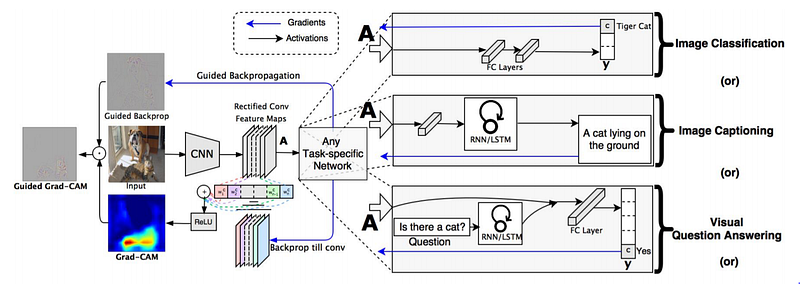
Grad-CAM overview: Given an image and a class of interest as input, we forward propagate the image through the CNN part of the model and then through task-specific computations to obtain a raw score for the category. The gradients are set to zero for all classes except the desired class (tiger cat), which is set to 1. This signal is then backpropagated to the rectified convolutional feature maps of interest, which we combine to compute the coarse Grad-CAM localization (blue heatmap) which represents where the model has to look to make the particular decision. Finally, we pointwise multiply the heatmap with guided backpropagation to get Guided Grad-CAM visualizations which are both high-resolution and concept-specific. Source: [1]
In this article, we are going to learn how to plot GradCam [1] in PyTorch.
To get the GradCam outputs, we need the activation maps and the gradients of those activation maps.
Let us jump straight into the code!!
Imports
import numpy as np
import matplotlib as mpl
import matplotlib.pyplot as plt
import torch
import torch.nn as nn
from torchvision import models
from skimage.io import imread
from skimage.transform import resize
Model
We are going to use hooks to get the activation maps and the gradients from the desired layer and tensor, respectively. For this tutorial, we are going to take the activation mapsfromlayer4ofResNet50 and gradientswith respect tothe output tensor of the same.
We add a forward hook to the layer of the ResNet50 model. The forward hook takes as arguments, the input to the layer and the output from the layer. To the output tensor, we register a hook using the register_hook method. This method registers a backward hook to a tensor and is called every time gradient is computed with respect to the tensor. Its input argument is the gradient with respect to that output tensor.
Declare a Model Instance
gcmodel = GradCamModel().to(‘cuda:0’)
Read Image
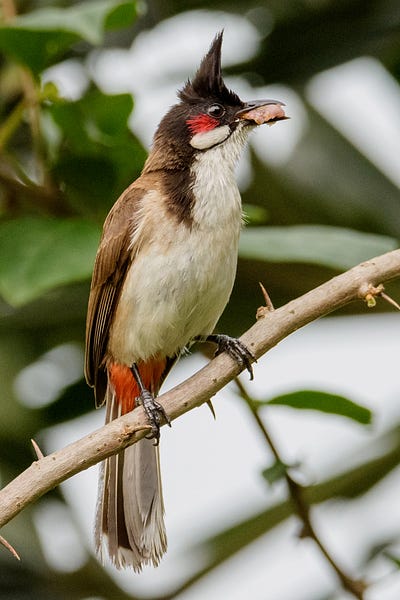
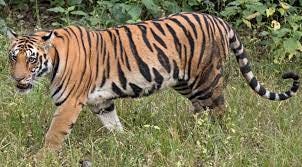
Source: Wikipedia
The image format and the library one uses for reading image may differ.
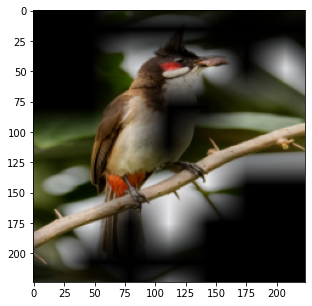
img = imread(‘/content/tiger.jfif’) #'bulbul.jpg'
img = resize(img, (224,224), preserve_range = True)
img = np.expand_dims(img.transpose((2,0,1)),0)
img /= 255.0
mean = np.array([0.485, 0.456, 0.406]).reshape((1,3,1,1))
std = np.array([0.229, 0.224, 0.225]).reshape((1,3,1,1))
img = (img — mean)/std
inpimg = torch.from_numpy(img).to(‘cuda:0’, torch.float32)
Compute Gradient Class Activation Maps
out, acts = gcmodel(inpimg)
acts = acts.detach().cpu()
loss = nn.CrossEntropyLoss()(out,torch.from_numpy(np.array([600])).to(‘cuda:0’))
loss.backward()

grads = gcmodel.get_act_grads().detach().cpu()

pooled_grads = torch.mean(grads, dim=[0,2,3]).detach().cpu()

for i in range(acts.shape[1]):
    acts[:,i,:,:] *= pooled_grads[i]
heatmap_j = torch.mean(acts, dim = 1).squeeze()
heatmap_j_max = heatmap_j.max(axis = 0)[0]
heatmap_j /= heatmap_j_max
Now, the heatmap needs to be resized and colour mapped.
Resize Heatmap
heatmap_j = resize(heatmap_j,(224,224),preserve_range=True)
Colour Mapping
cmap = mpl.cm.get_cmap(‘jet’,256)
heatmap_j2 = cmap(heatmap_j,alpha = 0.2)
Plotting
fig, axs = plt.subplots(1,1,figsize = (5,5))
axs.imshow((img*std+mean)[0].transpose(1,2,0))
axs.imshow(heatmap_j2)
plt.show()
Results
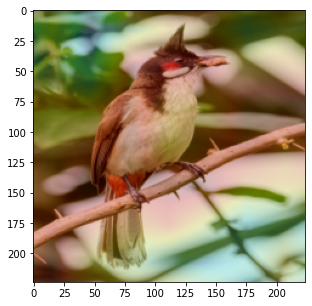
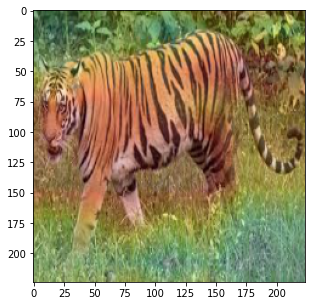
Other Type of Visualization for Gradcam
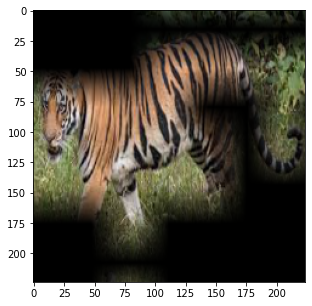
heatmap_j3 = (heatmap_j > 0.75)
Plotting
fig, axs = plt.subplots(1,1,figsize = (5,5))
axs.imshow(((img*std+mean)[0].transpose(1,2,0))*heatmap_j3)
plt.show()
Results
Remove the hooks
for h in gcmodel.layerhook:
    h.remove()
for h in gcmodel.tensorhook:
    h.remove()
Clap if you liked the post! Comment your feedback, if any!!
References
[1] R. R. Selvaraju, M. Cogswell, A. Das, R. Vedantam, D. Parikh and D. Batra, “Grad-CAM: Visual Explanations from Deep Networks via Gradient-Based Localization,” 2017 IEEE International Conference on Computer Vision (ICCV), 2017, pp. 618–626, doi: 10.1109/ICCV.2017.74.
Originally published on Medium.