A stacked bar chart uses bars to show comparisons between categories of data. It is mainly used to break down and compare parts of the levels of a categorical variable. One bar is plotted for each level of the first categorical variable, each bar’s length indicating a numeric value. Each bar in a standard bar chart is divided into a number of sub-bars stacked one on top of another. Each sub-bar corresponds with a level of a second categorical variable. The total length of each stacked bar is the same as before, but now we can see how the proportion of the contribution from the second categorical variable.
Let’s jump into the code.
In this article, we are going to plot the goal contributions in football for the season 2020–2021. The first variable is the Players. Goal contribution is Goals + Assists. These will form the two levels of the second variable Goal Contributions.
Imports
import numpy as np
import pandas as pd
import matplotlib.pyplot as plt
Data
columns = [‘Players’,’Goals’,’Assists’]
goaldf = pd.DataFrame(columns=columns)
datarr = np.array([[‘R. Lewandowski’,41,7],
                   [‘L. Messi’,30,9],
                   [‘H. Kane’,23,15],
                   [‘K. Mbappe’,26,8],
                   [‘E. Haaland’,27,6],
                   [‘Andre Silva’,28,5],
                   [‘C. Ronaldo’,29,2],
                   [‘K. Benzema’,23,8],
                   [‘M. Depay’,20,11]],
                  dtype = ‘object’)
for i in range(len(columns)):
 goaldf[columns[i]] = datarr[:,i]
The data looks like this
Players         Goals Assists
R. Lewandowski   41      7
L. Messi         30      9
H. Kane          23     15
K. Mbappe        26      8
E. Haaland       27      6
Andre Silva      28      5
C. Ronaldo       29      2
K. Benzema       23      8
M. Depay         20     11
Some Variables
b = []
colors = plt.cm.get_cmap(‘jet',4)
xticks = [i for i in range(len(goaldf))]
Plotting
fig, ax = plt.subplots(1,1)
for i in range(1,len(columns)):
    if i==1:
        bar_bottom = 0
    else:
        bar_bottom = bar_bottom + goaldf[columns[i-1]].values
    b.append(plt.bar(xticks,
                     goaldf[columns[i]].values,
                     bottom = bar_bottom,
                     color = colors(i)))
for i in range(len(b)):
    ax.bar_label(b[i],
                 padding = 0,
                 label_type = 'center',
                 rotation = 'horizontal')
ax.set_ylabel('Goal Contributions')
ax.set_xlabel('Players')
ax.set_xticks(xticks)
ax.set_xticklabels(goaldf['Players'].values, rotation = 45)#, rotation_mode = 'anchor')
ax.set_title('Top Ten Goal Contributions in 2020-2021')
ax.legend(b, columns[1:])
plt.show()
Results
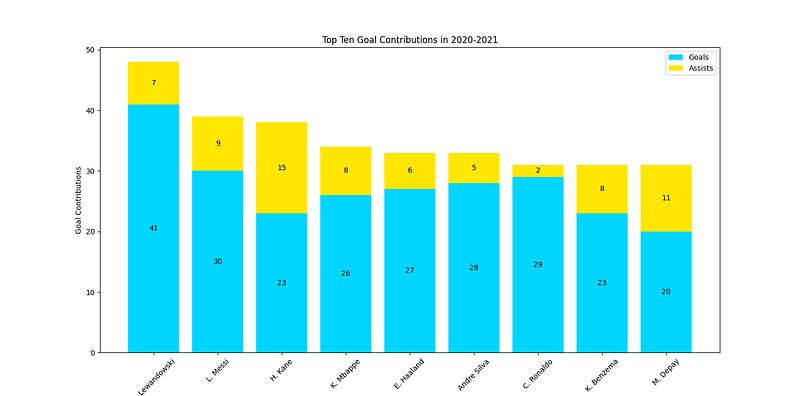
Clap if you like the post! Comment your feedbacks, if any!!
Originally published on Medium.