In this article, we are going to learn how to draw grouped bar charts (a.k.a clustered bar charts or multi-series bar charts) in Python using the Matplotlib library. Without further delay, let’s jump straight into the code.
The structuring of the code may differ on mobile and desktop! It is recommended to view in desktop mode when opened on mobile phones!
Imports
import numpy as np
import pandas as pd
import matplotlib.pyplot as plt
from matplotlib import colormaps
import math
Now, for the sake of this article, let us consider, we have three discrete labels, for which we need to visualize the value of some property. Let us consider, these three labels to be three football seasons, e.g. 2018–2019, 2019–2020, 2020–2021, and we are going to plot goals scored by some famous players over these three years.
Data
Players        2018–2019 2019–2020 2020–2021
C. Ronaldo         21        31        29
L. Messi           36        25        30
Neymar Jr.         15        13         9
R. Lewandowski     22        34        41
K. Mbappe          33        18        27
R. Lukaku          12        23        24
K. Benzema         21        21        23
Compile this data into a DataFrame, or an array, according to your preference. Here, I am assuming that the name of the data frame is stats.
Variables
w = 1.0
num_yrs = len(stats.columns) — 1 #stats.shape[1] - 1
num_plyrs = len(stats) #stats.shape[0]
Other parameters
first_tick = int(math.ceil((num_plyrs*w/2)))
gap = num_plyrs*w + 1
x = np.array([first_tick + i*gap for i in range(num_yrs)])
Choosing Colors
colors = colormaps['inferno']
# Deprecated
# colors = plt.cm.get_cmap(‘inferno’,num_plyrs)
Plotting
fig,ax = plt.subplots(1,1, figsize=(10,10))
b = []
for i in range(num_plyrs):
    b.append(ax.bar(x - (i - num_plyrs/2 + 0.5)*w,
             stats.loc[i].values[1:],
             width=w,
             color=colors(i),
             align='center',
             edgecolor = 'black',
             linewidth = 1.0,
             alpha=0.5))
ax.legend([b_ for b_ in b],
           stats['Players'].values.tolist(),
           ncol = 3,
           loc = 'best',
           framealpha = 0.1)

ax.set_ylabel('Goals')
ax.set_xlabel('Players')
ax.set_title('Goals scored by players')
ax.set_xticks(x)
ax.set_xticklabels(stats.columns.values[1:])
for i in range(num_plyrs):
    ax.bar_label(b[i],
                 padding = 3,
                 label_type='center',
                 rotation = 'vertical')
plt.show()
Result
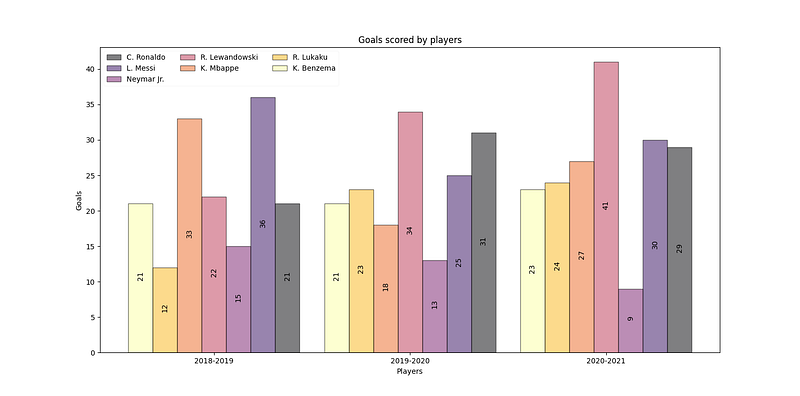
Result of the code
Clap if you like this post! Comment your feedback, if any!!
Originally published on Medium.