Using a Local MedGemma-4B Server as a Working Example
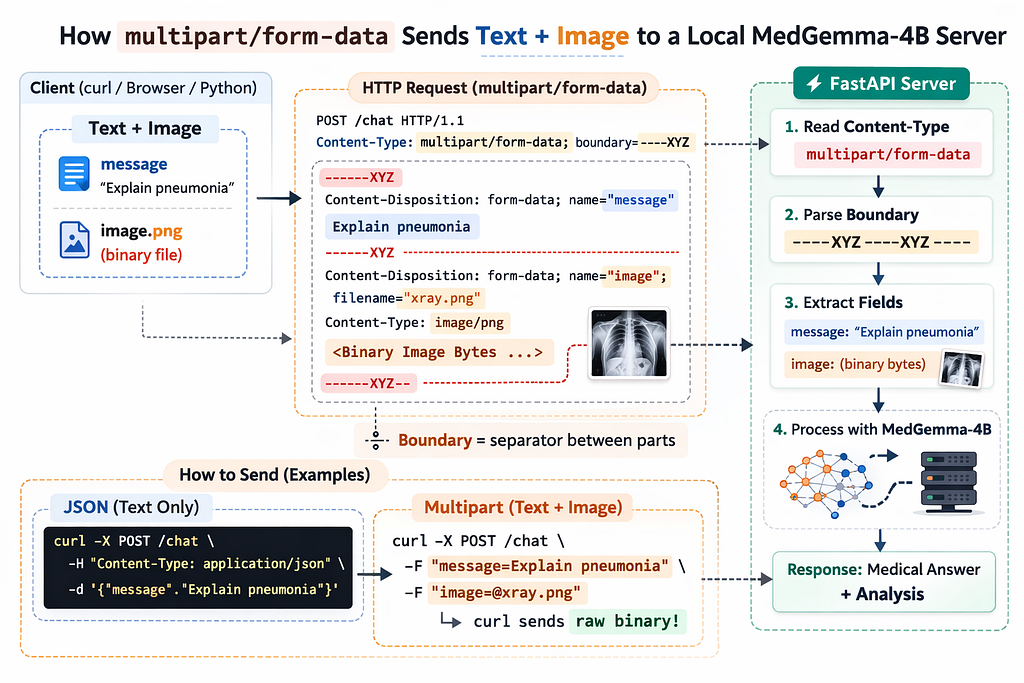
When you start serving large language models locally — like MedGemma-4B running behind a FastAPI server — you quickly encounter something that most ML engineers haven’t had to think about before:
HTTP body formats
Everything works fine when you send JSON. But the moment you want to send both:
- A text prompt
- An image (binary file)
You need to understand multipart/form-data.
This article explains:
- What multipart actually is
- Why it exists
- How HTTP encodes multiple fields
- How to send text-only requests
- How to send text + binary in the same request
- How to manually construct multipart bodies with boundaries
- How to design your API (single endpoint vs separate endpoints)
We’ll use a local MedGemma-4B server as our example.
Why Multipart Exists
Imagine we have a local server:
http://localhost:8000
And we want to call:
POST /chat
If we only send text, JSON works perfectly:
{
  "message": "Explain pneumonia"
}
But what if we want to send:
- A text message
- An image file
- Maybe more fields later
JSON cannot directly contain raw binary data.
Yes, you could base64-encode the image — but that:
- Increases size ~33%
- Adds processing overhead
- It is not ideal for large files
So HTTP provides a different encoding format:
multipart/form-data
It literally means:
The body is split into multiple independent parts.
🧠 What Multipart Does
multipart/form-data is simply:
A way to embed raw binary inside an HTTP body safely.
- It does not encode the file.
- It does not convert it to base64.
- It does not transform it.
- It simply wraps it inside boundaries.
What a Multipart Body Actually Looks Like
Here’s a real multipart request:
POST /chat HTTP/1.1
Content-Type: multipart/form-data; boundary=----ABC123
Body:
------ABC123
Content-Disposition: form-data; name="message"
Explain pneumonia
------ABC123
Content-Disposition: form-data; name="image"; filename="xray.png"
Content-Type: image/png
<RAW BINARY BYTES HERE>
------ABC123--
Key points:
- The boundary separates parts.
- Each part has its own headers.
- Each part has its own content.
- The final boundary ends with --.
That’s why it’s called multi-part.
Multiple Endpoints (chat and chat_multimodal)
Example Setup: Local MedGemma Server
Let’s assume we have two endpoints:
from fastapi import FastAPI, UploadFile, File, Form
from fastapi.responses import JSONResponse
from pydantic import BaseModel
from PIL import Image
import io
import base64

app = FastAPI()

# ---------------------------------------------------------
# JSON Schema for Text-Only Endpoint
# ---------------------------------------------------------
class ChatRequest(BaseModel):
    message: str
    image: str | None = None  # optional base64 image


# =========================================================
# Endpoint 1 — JSON (Text Only)
# =========================================================
@app.post("/chat")
async def chat(req: ChatRequest):

    message = req.message
    image_bytes = None
    pil_image = None

    # If base64 image is provided
    if req.image:
        image_bytes = base64.b64decode(req.image)
        pil_image = Image.open(io.BytesIO(image_bytes)).convert("RGB")

    return JSONResponse({
        "endpoint": "chat (JSON)",
        "received_message": message,
        "image_present": image_bytes is not None,
        "image_size_bytes": len(image_bytes) if image_bytes else None
    })


# =========================================================
# Endpoint 2 — Multipart (Text + Binary)
# =========================================================
@app.post("/chat_multimodal")
async def chat_multimodal(
    message: str = Form(...),
    image: UploadFile = File(None)
):

    image_bytes = None
    pil_image = None

    if image:
        # Read raw binary from HTTP body
        image_bytes = await image.read()

        # Convert to PIL image
        pil_image = Image.open(io.BytesIO(image_bytes)).convert("RGB")

    return JSONResponse({
        "endpoint": "chat_multimodal (multipart)",
        "received_message": message,
        "image_present": image_bytes is not None,
        "image_size_bytes": len(image_bytes) if image_bytes else None,
        "filename": image.filename if image else None
    })
Now let’s see how to call each.
Case 1 — Text Only (JSON)
Endpoint:
POST /chat
Using curl
curl -X POST http://localhost:8000/chat \
-H "Content-Type: application/json" \
-d '{"message":"Explain pneumonia"}'
This works because:
- FastAPI expects JSON
- Content-Type matches
- Body contains a valid JSON object
Case 2 — Text Only (Multipart)
You can also send text-only using multipart:
curl -X POST http://localhost:8000/chat_multimodal \
-F "message=Explain pneumonia"
Why does this work?
Because -F tells curl:
- Build a multipart body
- Generate boundary automatically
- Insert proper headers
Never manually set Content-Type when using -F.
Curl does it for you.
Case 3 — Text + Image (Multipart, Automatic)
This is the standard way:
curl -X POST http://localhost:8000/chat_multimodal \
-F "message=Describe this image" \
-F "image=@xray.png"
The ‘@’ tells curl:
Read file as binary and insert into multipart body.
CURL constructs:
- Boundary
- Content-Disposition
- Content-Type for file
- Binary transfer
And also does
- Reads file
- Streams bytes
You do not need to worry about formatting.
Case 4 — Manually Constructing Multipart (Educational)
Now let’s do it the hard way. Suppose we want full control and manually set:
Content-Type: multipart/form-data
We must include a boundary:
curl -X POST http://localhost:8000/chat_multimodal \
-H "Content-Type: multipart/form-data; boundary=----XYZ" \
--data-binary $'------XYZ\r\nContent-Disposition: form-data; name="message"\r\n\r\nExplain pneumonia\r\n------XYZ--\r\n'
Important:
- \r\n is required
- The Boundary must match the header
- The final boundary must end with --
If you forget the boundary, you get:
Missing boundary in multipart.
That’s because the server doesn’t know how to split parts.
Manual Text + Image Multipart
To send an image manually, create a file body.txt:
------XYZ
Content-Disposition: form-data; name="message"
Describe this image
------XYZ
Content-Disposition: form-data; name="image"; filename="xray.png"
Content-Type: image/png
<RAW BINARY BYTES HERE>
------XYZ--
Then:
curl -X POST http://localhost:8000/chat_multimodal \
-H "Content-Type: multipart/form-data; boundary=----XYZ" \
--data-binary @body.txt
This works, but it’s tedious. That’s why -F exists.
Single Unified Endpoint (JSON + Multipart)
Instead of separate endpoints, you can inspect Content-Type:
from fastapi import FastAPI, Request
from fastapi.responses import JSONResponse
from PIL import Image
import io
import base64

app = FastAPI()

@app.post("/chat")
async def chat(request: Request):

    content_type = request.headers.get("content-type", "")

    message = None
    image_bytes = None
    pil_image = None

    # --------------------------------------------------
    # Case 1: JSON (Text Only)
    # --------------------------------------------------
    if "application/json" in content_type:
        body = await request.json()
        message = body.get("message")

        # Optional: JSON may contain base64 image
        if "image" in body:
            image_bytes = base64.b64decode(body["image"])
            pil_image = Image.open(io.BytesIO(image_bytes)).convert("RGB")

    # --------------------------------------------------
    # Case 2: Multipart (Text + Binary Image)
    # --------------------------------------------------
    elif "multipart/form-data" in content_type:
        form = await request.form()

        message = form.get("message")

        file = form.get("image")

        if file:
            # Read raw binary bytes
            image_bytes = await file.read()

            # Convert binary → PIL
            pil_image = Image.open(io.BytesIO(image_bytes)).convert("RGB")

    else:
        return JSONResponse(
            {"error": "Unsupported Content-Type"},
            status_code=415
        )

    if not message:
        return JSONResponse(
            {"error": "Message is required"},
            status_code=400
        )

    # --------------------------------------------------
    # Debug: Show what we received
    # --------------------------------------------------
    response_data = {
        "received_message": message,
        "image_present": image_bytes is not None,
        "image_size_bytes": len(image_bytes) if image_bytes else None
    }

    return JSONResponse(response_data)
Now both work:
JSON:
curl -H "Content-Type: application/json" \
-d '{"message":"Explain pneumonia"}'
Multipart:
curl -F "message=Explain pneumonia"
curl EXTRAS
🧠 1️⃣ curl Automatically Switches to POST
If you write:
curl -H "Content-Type: application/json" \
-d '{"message":"Explain pneumonia"}' \
http://localhost:8000/chat
You did not specify -X POST.
But -d (or --data) implicitly means:
Send a POST request.
So curl internally transforms that into:
POST /chat HTTP/1.1
Same with -F:
curl -F "message=Explain pneumonia" \
http://localhost:8000/chat
Using -F also automatically sets:
POST
Content-Type: multipart/form-data
So -X POST is optional.
🧠 2️⃣ When Do You Need -X POST?
You need -X POST when:
- You are NOT using -d
- You are NOT using -F
- You are manually constructing the body
Example:
curl -X POST http://localhost:8000/chat
Without -X, curl defaults to:
GET
Why Production APIs Often Separate Endpoints
In real systems:
- /chat → JSON
- /chat_multimodal → multipart
Why?
Because:
- Clear contract
- Easier documentation
- Better validation
- Cleaner OpenAPI schema
But for learning and flexibility, a unified endpoint is perfectly fine.
Multipart vs JSON vs URL Encoded
|          Format       | Supports Files|Human Readable | Typical Use |
| — — — — — — — — — — — | — — — — — — — | — — — — — — — | — — — — — — |
| JSON                  | ❌            | ✅             | APIs        |
| x-www-form-urlencoded | ❌            | Yes           | Simple forms |
| multipart/form-data   | ✅            | No            | File uploads |
When serving MedGemma locally:
- JSON is perfect for pure chat
- Multipart is required for multimodal input
- The server must parse boundary-separated parts
- The client must construct the body correctly
Understanding multipart means you now understand:
- HTTP body encoding
- File upload protocols
- How FastAPI parses form data
- How frontend and backend communicate
🧠 What Actually Happens End-to-End
1️⃣ Client (curl / browser)
curl -F "message=Describe this" \
     -F "image=@xray.png" \
     http://localhost:8000/chat
What does Curl do:
- Reads file in binary mode
- Streams raw bytes
- Wraps them in multipart boundaries
- Sends to the server
No base64 involved.
2️⃣ FastAPI Receives It
Your endpoint:
image: UploadFile = File(...)
What FastAPI does:
- Parses boundary
- Extracts file section
- Stores it temporarily
- Wraps it as UploadFile
Then:
image_bytes = await image.read()
Now you have:
bytes
Raw binary data in memory.
🧩 Now You Decide What To Do With It
From raw bytes, you can:
✅ Option A — Convert to PIL Image (Most Common for Vision Models)
from PIL import Image
import io
image_bytes = await image.read()
pil_image = Image.open(io.BytesIO(image_bytes)).convert("RGB")
Now you can pass it directly to:
- processor(images=pil_image, ...)
- torchvision transforms
- NumPy conversion
This is ideal for MedGemma multimodal inference.
✅ Option B — Convert to Base64 (If Required)
Only needed if:
- You want to send an image forward in JSON
- You store it in the database as text
- You call another API that expects base64
import base64
encoded = base64.b64encode(image_bytes).decode("utf-8")
Now you have:
{
  "image": "iVBORw0KGgoAAAANSUhEUgAA..."
}
But remember:
- Base64 increases size ~33%
- Slower
- Not needed for local inference
Final Takeaway
multipart/form-data is called “multi-part” because:
The HTTP body is physically split into multiple independently described parts using boundaries.
It allows:
- Text fields
- Binary files
- Multiple values
- Metadata per field
Without base64 hacks.
Understanding multipart/form-data: How to Send Text + Binary Data in HTTP Requests was originally published in The Owl on Medium, where people are continuing the conversation by highlighting and responding to this story.
Originally published on Medium.