You Must Build llama.cpp first
If you try to run:
./llama-server -m medgemma-4b-it-Q4_K_M.gguf --port 8000
And you see:
./llama-server: No such file or directory
That does not mean the model is missing.
It means:
You have not built llama.cpp.
Unlike the Python package llama-cpp-python, the llama-server executable is not pre-installed anywhere. It is part of the C++ repository and must be compiled.
🧠 Why This Step Is Required
There are two different components that people often confuse:
|      Component    |     How It’s Installed    |    What It Provides   |
| — — — — — — — — — | — — — — — — — — — — — — — | — — — — — — — — — — — |
| `llama-cpp-python`| `pip install`             | Python bindings       |
| `llama.cpp` (C++) | Must be built from source | `llama-server` binary |
If you only installed:
pip install llama-cpp-python
You do not get:
llama-server
That executable only exists after building the C++ project.
🏗 Building llama.cpp from Scratch
Below are the correct steps for Linux / macOS (including Colab).
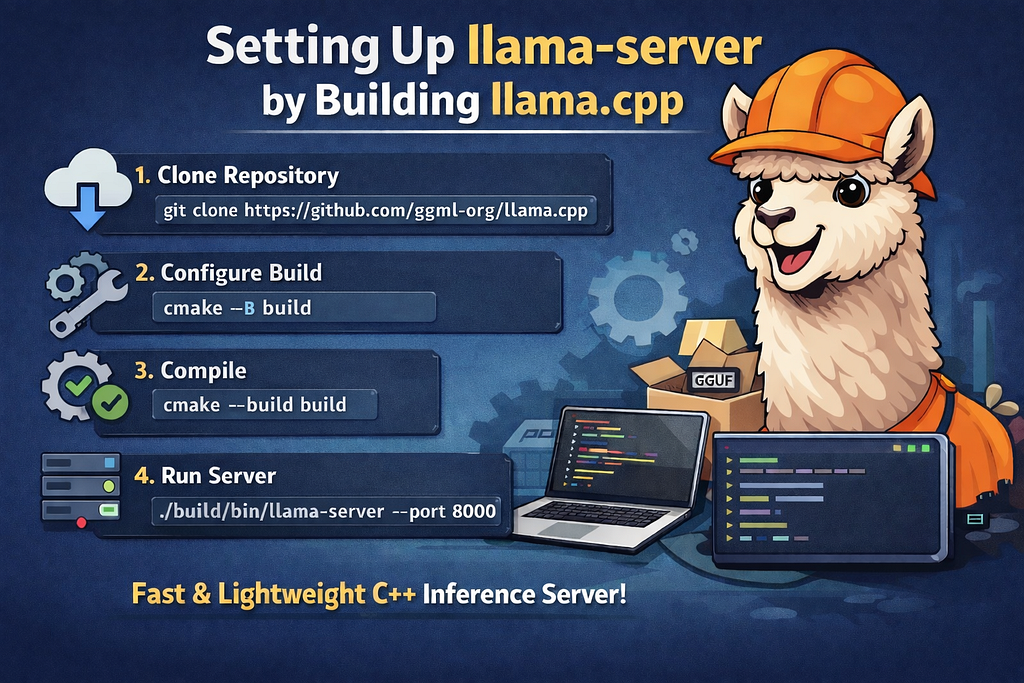
1️⃣ Clone the Repository
git clone https://github.com/ggml-org/llama.cpp
cd llama.cpp
This downloads the source code.
2️⃣ Configure the Build
If you want Hugging Face auto-download support (--hf-repo, --hf-file), you must enable CURL:
cmake -B build -DGGML_CURL=ON
If you want CUDA support (on GPU machines):
cmake -B build -DGGML_CUDA=ON -DGGML_CURL=ON
For Apple Silicon with Metal:
cmake -B build -DGGML_METAL=ON -DGGML_CURL=ON
3️⃣ Compile the Project
cmake --build build --config Release
After this completes, the binary will exist at:
build/bin/llama-server
Not in the root folder.
🚀 Running llama-server
Now you can run:
./build/bin/llama-server \
  --hf-repo unsloth/medgemma-4b-it-GGUF \
  --hf-file medgemma-4b-it-Q4_K_M.gguf \
  --port 8000

# Alternative way to run multimodal models
# Automatically downloads mmproj model,
# by default chooses Q4_K_M, or the first one if it is not present
./build/bin/llama-server \
  -hf unsloth/medgemma-4b-it-GGUF \
  --port 8000
Or if models are local:
./build/bin/llama-server \
  -m ./models/medgemma-4b-it-Q4_K_M.gguf \
  --mmproj ./models/mmproj-BF16.gguf \
  --port 8000
📁 Why the Binary Is in build/bin/
llama.cpp uses CMake.
CMake places compiled artefacts inside a build directory to:
- Separate source from compiled files
- Allow multiple build configurations
- Avoid polluting the repo
That’s why:
./llama-server
doesn’t work. You must use:
./build/bin/llama-server
🔎 Verifying the Build
To confirm it worked:
ls build/bin
You should see:
llama-server
llama-cli
quantize
...
If you don’t see llama-server, the build did not succeed.
✅ How To Make llama-server Callable Globally
Option 1 — Add to PATH
export PATH=$PATH:/full/path/to/llama.cpp/build/bin
Now you can run:
llama-server
Option 2 — Create a Symlink
sudo ln -s /full/path/to/llama.cpp/build/bin/llama-server /usr/local/bin/llama-server
Now it behaves like a system command.
🔐 Important: Enabling Hugging Face Download
If you want to use:
--hf-repo
--hf-file

# or

-hf
You must compile with:
-DGGML_CURL=ON
Otherwise, the flags will exist, but downloading will fail.
🧠 Final Takeaway
llama-server is not a pip tool.
It is a compiled C++ executable.
Before using it, you must:
- Clone llama.cpp
- Configure CMake
- Build the project
- Run the binary from build/bin/
⚙️ How to Start Using llama-server was originally published in The Owl on Medium, where people are continuing the conversation by highlighting and responding to this story.
Originally published on Medium.