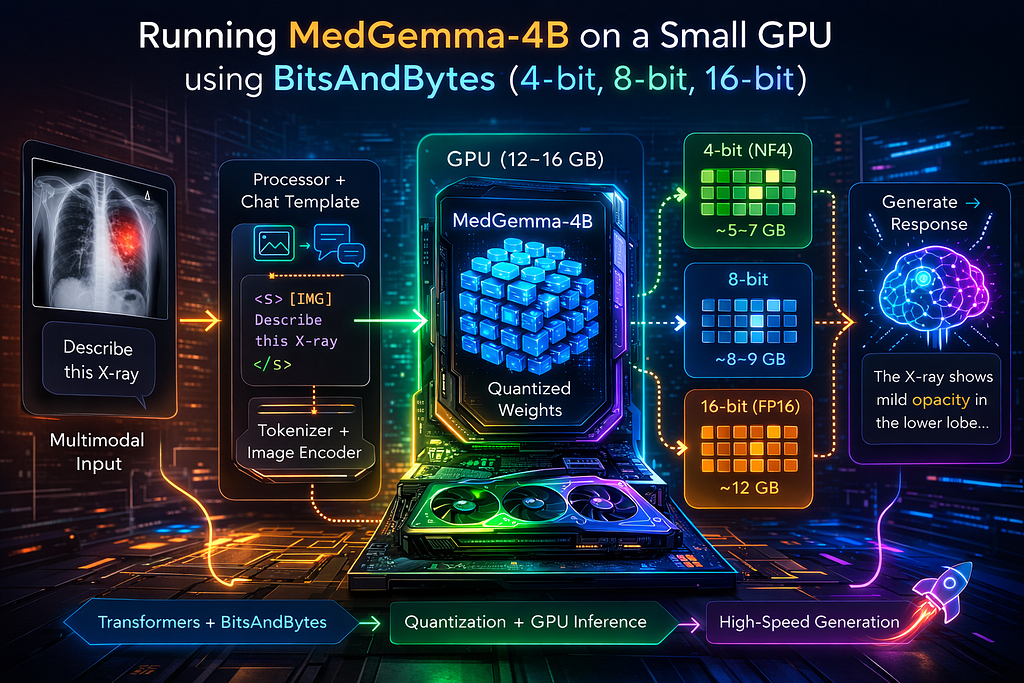
Large multimodal models usually demand serious hardware. A 4B parameter model in full precision occupies roughly 8GB just for weights — and that’s before accounting for activations and KV cache during generation.
If you are using Google Colab (T4, 15GB VRAM) or a consumer GPU like an RTX 3060 (12GB), you quickly run into memory limits.
This is where bitsandbytes becomes extremely powerful.
Instead of storing each model parameter in 16 bits, we compress them to 8-bit or 4-bit — dramatically reducing memory consumption — while preserving most of the model’s intelligence.
In this tutorial, we will run MedGemma-4B-IT using:
- 16-bit (baseline)
- 8-bit quantization
- 4-bit NF4 quantization
And we’ll explain what each function actually does internally.
Why Use BitsAndBytes?
BitsAndBytes integrates directly into the HuggingFace Transformers stack. That means:
- You still use PyTorch
- You still use model.generate()
- You can fine-tune later (QLoRA)
- You keep multimodal compatibility
Unlike CPU-based runtimes, this path is GPU-optimized and ideal for research.
Step 1 — Installing the Required Libraries
pip install transformers accelerate bitsandbytes sentencepiece
Here’s what each library contributes:
- transformers loads model architecture and handles generation.
- accelerate automatically decides whether tensors go to CPU or GPU.
- bitsandbytes replaces standard linear layers with quantized kernels.
- sentencepiece supports the tokenizer backend used by Gemma.
When you import:
from transformers import AutoProcessor, AutoModelForImageTextToText
from transformers import BitsAndBytesConfig
You are pulling in abstractions that dynamically construct the correct model class based on configuration metadata stored on HuggingFace.
Step 2 — Loading the Model in 16-bit (Baseline)
model = AutoModelForImageTextToText.from_pretrained(
    model_id,
    torch_dtype=torch.float16,
    device_map="auto",
)
Let’s unpack this.
What does from_pretrained() actually do?
Internally, it:
- Downloads the model configuration (config.json)
- Instantiates the architecture class
- Loads weight tensors into memory
- Places them on the appropriate device
When you set:
torch_dtype=torch.float16
All weight tensors are loaded in FP16 format (2 bytes per parameter).
For a 4B model:
4 billion × 2 bytes ≈ 8GB
That’s just weights — activations during inference increase this.
What does device_map="auto" do?
This uses Accelerate to inspect available GPU memory and distribute layers accordingly. If memory is tight, some layers may spill to the CPU automatically.
Step 3–8-bit Quantization
bnb_config = BitsAndBytesConfig(load_in_8bit=True)
model = AutoModelForImageTextToText.from_pretrained(
    model_id,
    quantization_config=bnb_config,
    device_map="auto"
)
Now something interesting happens.
When load_in_8bit=True is passed:
- Standard nn.Linear layers are replaced with Linear8bitLt
- Weight tensors are stored in 8-bit integer format
- During the forward pass, they are dynamically dequantized into floats for computation
The key insight:
Weights are compressed in memory, but computation still happens in higher precision.
This cuts memory roughly in half while preserving numerical stability. In practice:
- VRAM drops from ~12GB → ~8–9GB
- Speed impact is minimal
- Output quality remains very close to FP16
Step 4–4-bit NF4 Quantization
bnb_config = BitsAndBytesConfig(
    load_in_4bit=True,
    bnb_4bit_quant_type="nf4",
    bnb_4bit_compute_dtype=torch.bfloat16
)
Now we move into more aggressive compression.
What is NF4?
NF4 (NormalFloat4) is not naive 4-bit rounding.
Instead:
- It assumes weights follow a normal distribution
- Uses learned scaling factors
- Minimizes quantization error statistically
Internally, during inference:
- Weights are stored as 4-bit packed tensors
- Each block has scaling metadata
- They are reconstructed on-the-fly during matrix multiplication
This allows a 4B model to fit in ~5–7GB VRAM. This is how Colab T4 can run MedGemma comfortably.
Step 5 — Preparing Multimodal Input
processor = AutoProcessor.from_pretrained(model_id)
The AutoProcessor abstracts:
- Tokenizer
- Image preprocessor
- Chat formatting logic
When you call:
processor.apply_chat_template(...)
Internally, it:
- Formats messages into structured tokens
- Inserts special tokens like <start_of_turn>
- Encodes images into embedding tensors
- Returns a PyTorch dictionary ready for generation
- Example:
<start_of_turn>system
You are an expert radiologist.
<end_of_turn>
<start_of_turn>user
Describe this X-ray
<start_of_image>
<end_of_turn>
<start_of_turn>model
This is essential for multimodal models — you cannot simply pass raw text.
Step 6 — Generation
generation = model.generate(**inputs, max_new_tokens=200)
Under the hood:
- The model builds a KV cache
- Attention layers reuse past keys and values
- Tokens are generated autoregressively
- Sampling or greedy decoding is applied
Quantized models still use the same generation logic — only weight storage differs.
Full Script
# =========================================================
# MedGemma-4B-IT — Transformers + BitsAndBytes Version
# =========================================================
# Install if needed:
# pip install transformers accelerate bitsandbytes sentencepiece
import torch
import gc
from transformers import AutoProcessor, AutoModelForImageTextToText, BitsAndBytesConfig,
from PIL import Image
import requests

model_id = "google/medgemma-4b-it"
# — — — — — — — — — — — — — — — — — — — — — — — — — — — — -
# Utility: Print GPU memory usage
# — — — — — — — — — — — — — — — — — — — — — — — — — — — — -
def print_vram(stage):
  if torch.cuda.is_available():
    allocated = torch.cuda.memory_allocated() / 1024**3
    reserved = torch.cuda.memory_reserved() / 1024**3
    print(f"\n{stage}")
    print(f"Allocated: {allocated:.2f} GB")
    print(f"Reserved : {reserved:.2f} GB")
    print("-" * 40)
  else:
    print("CUDA not available.")

# — — — — — — — — — — — — — — — — — — — — — — — — — — — — -
# Load Model (4bit, 8bit, or 16bit)
# — — — — — — — — — — — — — — — — — — — — — — — — — — — — -
def load_model(quant=None):
  gc.collect()
  if torch.cuda.is_available():
    torch.cuda.empty_cache()

  if quant == "4bit":
    print("Loading 4-bit NF4 quantized model...")
    bnb_config = BitsAndBytesConfig(
                                    load_in_4bit=True,
                                    bnb_4bit_quant_type="nf4",
                                    bnb_4bit_compute_dtype=torch.bfloat16,
                                    )
    model = AutoModelForImageTextToText.from_pretrained(
                                      model_id,
                                      quantization_config=bnb_config,
                                      device_map="auto",
                                      )
  elif quant == "8bit":
    print("Loading 8-bit quantized model...")
    bnb_config = BitsAndBytesConfig(load_in_8bit=True)
    model = AutoModelForImageTextToText.from_pretrained(
                                      model_id,
                                      quantization_config=bnb_config,
                                      device_map="auto",
                                      )
  else:
    print("Loading FP16 model...")
    model = AutoModelForImageTextToText.from_pretrained(
                                      model_id,
                                      torch_dtype=torch.float16,
                                      device_map=”auto”,
                                      )

  print_vram(f”After loading ({quant or ‘fp16’})”)
  return model

# — — — — — — — — — — — — — — — — — — — — — — — — — — — — -
# Select quantization mode
# Options: None (FP16), “8bit”, “4bit”
# — — — — — — — — — — — — — — — — — — — — — — — — — — — — -
quant_mode = "8bit" # change to “4bit” or None
model = load_model(quant=quant_mode)
processor = AutoProcessor.from_pretrained(model_id)
# — — — — — — — — — — — — — — — — — — — — — — — — — — — — -
# Load sample image
# — — — — — — — — — — — — — — — — — — — — — — — — — — — — -
image_url = "https://upload.wikimedia.org/wikipedia/commons/c/c8/Chest_Xray_PA_3-8-2010.png"
image = Image.open(requests.get(image_url, stream=True).raw)
# — — — — — — — — — — — — — — — — — — — — — — — — — — — — -
# Construct multimodal chat messages
# — — — — — — — — — — — — — — — — — — — — — — — — — — — — -
messages = [
  {
    "role": "system",
    "content": [{"type": "text", "text": "You are an expert radiologist."}],
  },
  {
    "role": "user",
    "content": [
      {"type": "text", "text": "Describe this X-ray."},
      {"type": "image", "image": image},
                ],
  },
]
# — — — — — — — — — — — — — — — — — — — — — — — — — — — — -
# Prepare model inputs using chat template
# — — — — — — — — — — — — — — — — — — — — — — — — — — — — -
inputs = processor.apply_chat_template(
                                      messages,
                                      add_generation_prompt=True,
                                      tokenize=True,
                                      return_dict=True,
                                      return_tensors="pt",
                                      )
inputs = inputs.to(model.device)
input_len = inputs["input_ids"].shape[-1]
# — — — — — — — — — — — — — — — — — — — — — — — — — — — — -
# Generate response
# — — — — — — — — — — — — — — — — — — — — — — — — — — — — -
torch.cuda.reset_peak_memory_stats()
with torch.inference_mode():
  output = model.generate(
                          **inputs,
                          max_new_tokens=200,
                          do_sample=False,
                          )
  generated_tokens = output[0][input_len:]
  decoded = processor.decode(generated_tokens, skip_special_tokens=True)
print("\nModel Response:\n")
print(decoded)
if torch.cuda.is_available():
  peak = torch.cuda.max_memory_allocated() / 1024**3
  print(f"\nPeak VRAM during generation: {peak:.2f} GB")
Sample Output
Okay, based on the image provided, here’s a description of the X-ray:
**Overall Impression:** The X-ray shows a standard chest view,
demonstrating the lungs, heart, major vessels, and bony structures of the chest wall.
The image is well-exposed and shows good visualization of the mediastinum and lung fields.
**Specific Findings:**
* **Lungs:** The lungs appear clear, with no obvious consolidation, nodules, or masses.
There is no evidence of significant pulmonary edema or pleural effusion.
* **Heart:** The heart size appears within normal limits.
The cardiomediastinal silhouette is unremarkable.
* **Mediastinum:** The mediastinum is unremarkable, with no obvious masses or enlarged lymph nodes.
* **Bones:** The ribs and clavicles appear intact.
There is no evidence of fractures or significant degenerative changes.
* **Soft Tissues:** The soft tissues of the chest wall are unremarkable.
When Should You Use BitsAndBytes?
Use this path when:
- You have a GPU
- You want speed
- You may fine-tune later
- You are experimenting with multimodal reasoning
It is the best balance between performance and flexibility.
Running MedGemma-4B on a Small GPU (<16GB) Using BitsAndBytes was originally published in The Owl on Medium, where people are continuing the conversation by highlighting and responding to this story.
Originally published on Medium.