
In the previous article (Chess — Part 0), we discussed the basic topics we will walk through and the essentials for building a chess engine. The first thing that we encountered was ‘board representations’ which can be implemented using the python-chess library in Python.
However, the most important part of building a chess engine (CE) is to ensure that it successfully communicates with any GUI following a standard input (stdin) / output (stdout) protocol (Chess Engine Communication Protocol or Universal Chess Interface).
In this article, we will go through the steps to establish communication between CE and GUI and also exchange commands. The steps are:
- Download a suitable GUI and install it (or build it from the source).
- Build a dummy Chess Engine and test communication.
1. Download and Build GUI (EnCroissant)
To choose a GUI, we can look at the Stockfish Wiki for information. I will be using EnCroissant as it was the only one running well on my Mac.
Follow the steps in the ReadMe file to build it from the source (if you want)
git clone https://github.com/franciscoBSalgueiro/en-croissant
cd en-croissant
pnpm install
pnpm build
The built app will be stored as an executable in en-croissant-master/src-tauri/target/release/ .
However, on MacOS Sequoia 15.2*, it may freeze. Readers can follow this solution* here to deal with it.
Once it is done, let’s proceed to see how the communication is done between the engine and the GUI. Readers can install the Stockfish engine for testing this part and it can be done through EnCroissant itself.
2. Communication Procedure (stdin / stdout)
The communication between GUI and Engine is done through stdin and stdout.
However, one may wonder (or may not, but I did) if the GUI and CE are communicating through stdin and stdout, then can the communication channel be interfered with by malicious inputs/outputs from outside?
The answer is NO.
The GUI instantiates the CE as a child process with itself acting as the parent process. In this case, the GUI has control over the input and output streams of the CE.
3. Build Dummy Chess Engine
To initiate communication with the GUI, we need a Chess Engine (let’s call it CE from now on), which can handle the input from the GUI coming through stdin and send back an appropriate response through stdout.
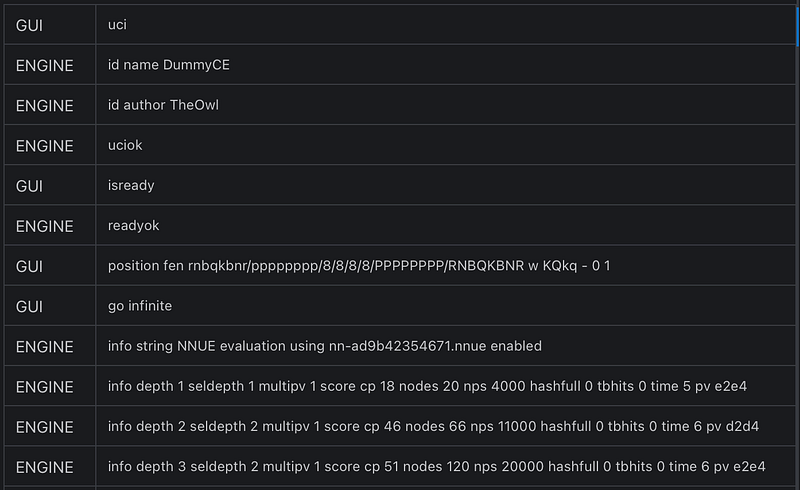
Below is the dummy chess engine code, which only communicates the first few rounds with the GUI (En-Croissant in my case). I copied the response to go UCI command from this page of Stockfish Wiki.
But, we need to make it into an executable, since I have not built my own Chess GUI or App and using EnCroissant built from source.
4. Make Chess Engine Executable
I will be using pyinstaller. The readers are free to choose any library depending on their OS. Regardless of the tool you choose, test your executable thoroughly to ensure it works as expected.
For reference on different types of libraries for generating an executable from Python script, the readers can go through this article below:
After running the following command in the terminal
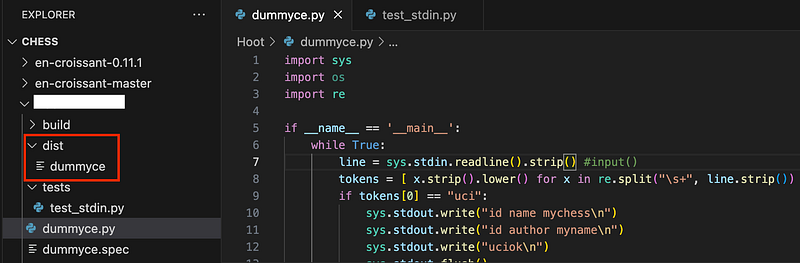
pyinstaller --onefile dummyce.py
We can see that the executable is generated in the dist folder
5. Test Communication in GUI
We open the En-Croissant executable (located at /Users/smanna/Documents/Codes/Chess/en-croissant-0.11.1/src-tauri/target/release) and load the Dummy chess engine following the instructions given here.
After opening En-Croissant, go to
Engines > Add New > Local > Select your chess engine executable
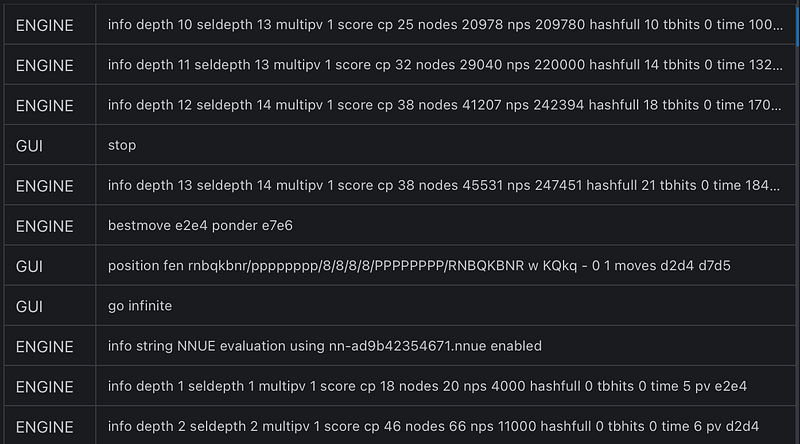
Select an ‘Analysis Board’, and enable the engine. On inspecting the ‘Logs’ in the right panel, we can see the exchange of commands and messages between the GUI and CE.
6. Demo: Dummy CE with En-Croissant GUI
</images/blog/chess-part-1-establishing-communication-between-chess-engine/img6.png>
We can see that our dummy chess engine can successfully communicate with the En-Croissant GUI. This article gives us the necessary understanding of the communication process between the GUI parent process and the chess engine in the child process.
In the next article, we will take the first step towards building the real chess engine. We will start with the search algorithms, followed by evaluation methods. Then we will further try to improve the implementation using different methods.
Clap, Share and Follow if you like found this article helpful.
Originally published on Medium.