In this article, we will go over the basics that need to be known before we start building our chess-playing AI. This article is not an attempt to replace ‘Chess Programming Wiki (CPW)’ where the reader can find the information provided in this article in greater detail. The readers can treat this article as providing pointers to the pre-requisites needed for the final objective. There are many concepts which may be needed on our journey and I will try my best to list them here.
That being said, let us list a few things that we are going to cover in this article:
- Board Representation (Very Important).
- Incorporating ‘rules’ in the board representation (Also very important).
- Search and Evaluation (Again very important).
- Chess Engine Communication Protocol (CECP) and Universal Chess Interface (UCI)
- Forsyth-Edward Notation (FEN) and Portable Game Notation (PGN)
1. Board Representation
As stated in CPW, board representation is the foundation of chess programming. It includes the pieces, the squares and the rules. The very first step we need to take is to build a bug-free board representation with all the rules embedded into it. Every move will depend on how well the board is built.
Readers using Python (like me) can use python-chess. There are several other blogs on python-chess, that the readers can have a look at, like this one. As we are going to use Python for the rest of the series, we can safely say that the board representation can be handled using python-chess. However, we need to find a way to add a GUI on top of the engine that we are going to build. There are several GUIs available on the web which can be downloaded and used offline, like LiChess. The reader can also find different other GUIs and information on how to install a chess engine here. Among the others, En Croissant and Nibbler are also my favourites. In my opinion, any GUI which can provide insights and analysis should be chosen.
python-chess Library
It is a high-level library and you can generate moves, make or unmake moves, and detect checks, draws, stalemates, and repetitions. It also allows to parse and export in PGN or FEN formats. Below is a short example of the interface python-chess provides:
>>> import chess
>>> board = chess.Board()
>>> board.legal_moves
<LegalMoveGenerator at ... (Nh3, Nf3, Nc3, Na3, h3, g3, f3, e3, d3, c3, ...)>
>>> chess.Move.from_uci("a8a1") in board.legal_moves
False
>>> board.push_san("e4")
Move.from_uci('e2e4')
>>> board.push_san("e5")
Move.from_uci('e7e5')
>>> board.push_san("Qh5")
Move.from_uci('d1h5')
>>> board.is_checkmate()
True
>>> board
Board('r1bqkb1r/pppp1Qpp/2n2n2/4p3/2B1P3/8/PPPP1PPP/RNB1K1NR b KQkq - 0 4')
>>> board.is_stalemate()
False
>>> board.is_insufficient_material()
False
>>> board.outcome()
Outcome(termination=<Termination.CHECKMATE: 1>, winner=True)
>>> board.can_claim_threefold_repetition()
False
>>> board.can_claim_fifty_moves()
False
>>> board.can_claim_draw()
False
Reference: https://python-chess.readthedocs.io/en/latest/
2. Search and Evaluation
Searching for a new move and evaluating it are the keys to gameplay. In this series, we will look at several search algorithms like MiniMax and NegaMax. People have also applied techniques like Alpha-Beta Pruning, Iterative Deepening, Internal Iterative Deepening, Transposition Tables, etc. to improve the search speed and to find better moves faster.
We will discuss all these algorithms in brief in the next part of the Series and also try our hands on these algorithms in Python. However, the reader is free to choose any other language as well.
Several modern frameworks like Stockfish use NNUE, a neural network-based evaluation function. While being slower than handcrafted evaluation functions, NNUE does not suffer from the ‘blindness beyond the current move’ problem.
3. Communication Protocols: CECP vs UCI
It seems very intuitive that the chess engines need to have a standardized input/output. Otherwise, we would have to make a standalone GUI for every chess engine in the world. And, guess what? There exists a protocol just for that.
It is called the ‘Chess Engine Communication Protocol’. It is an open communication protocol for chess engines to play games automatically, that is to communicate with other chess-playing entities. As of now, this protocol has been largely obsoleted by UCI (Universal Chess Interface) which we will discuss later below.
Once the basic framework is ready, I will try to provide a demo on
how to incorporate our chess engine into a GUI.
4. Universal Chess Interface (UCI)
The UCI protocol documentation is available here. The important things which will need to be kept in mind to successfully enable the communication of our chess engine with the GUI are the following:
- all communication is done via standard input and output with text commands
- the engine should wait for the "isready" or "setoption" command to set up its internal parameters
These are the standard protocols for primary communication. Next, let us take a look at the other commands that are used for game-playing right from the start. Each row represents a sequential command.
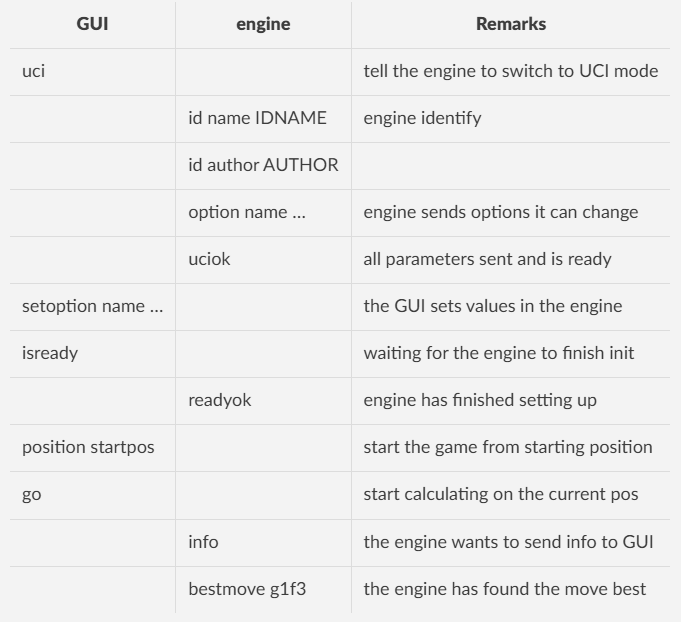
Apart from these commands, there are several commands which will be required for successfully integrating our engine with any GUI and we will discuss them after we build the basic framework for our engine.
5. Board Notations: FEN and PGN
Forsyth-Edwards Notation (FEN) is the standard notation used to describe the position of the pieces on a chess board. This notation system was created by computer programmer Steven J. Edwards, who based it on a previous system designed by journalist David Forsyth. Edwards modified the older notation to make it more suitable for use in chess software.
On the other hand, PGN stands for Portable Game Notation, and it is a standard format used to record and store chess games. PGN is a text-based format that allows chess games to be easily shared, stored, and analyzed. It includes the moves of the game, as well as additional information such as the names of the players, the tournament details, the result of the game, and any commentary or annotations.
FEN is different from the PGN and it only denotes a single position. It can represent the whole board along with the piece placements in a single string. On the other hand, PGN files contain more information than FEN. It contains the event name, date, player names, ELo of the players, the moves played in order (in algebraic notation), and finally the result of the game. It enables you to analyse games as you can upload them to any site like chess.com.
Thank you for reading till the end. Hope you liked the content. Stay tuned for Part 1.
Clap, Subscribe and Share if you liked this article.
Originally published on Medium.