
This article is not a tutorial on “How to send messages using Telegram bot to your device” (because you can find lots of better tutorials on the web on that topic), but that part has been covered too in this post. This article aims to show a simple implementation of how the above-mentioned feature can be utilised to send regular updates to your device, when you are not directly observing your Deep Learning model training, running on a remote machine, or not present in your Lab to keep an eye on the training progress and statistics.
Step 1: Create a Telegram Bot
- Open Telegram App on your device
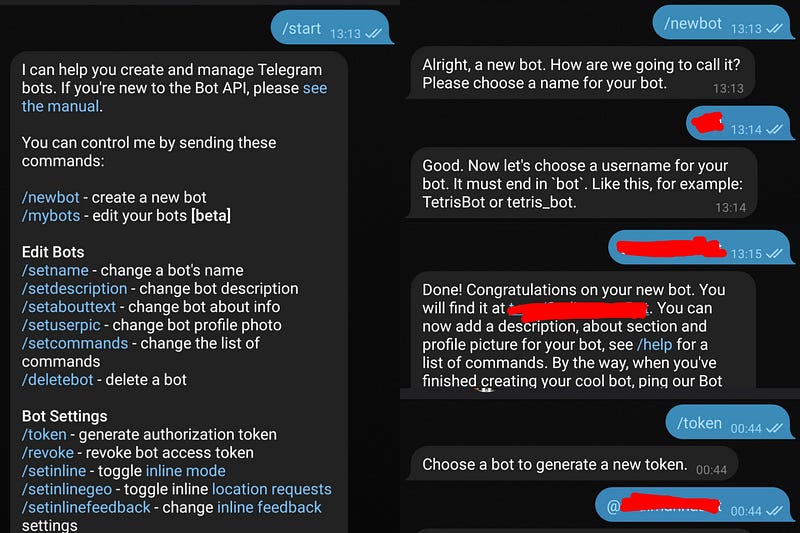
- Search @BotFather and click/tap on it and send the message ‘/start’.

Type @BotFather
-
Then you will receive a message from BotFather
-
Send ‘/newbot’ and then follow the instructions given by BotFather.
-
Send ‘/token’ to get HTTP API access token.
Step 2: Creating the botCallback Class
Now we will create a custom callback class inherting the tf.keras.callbacks.Callback class as the base class.
Custom callbacks can be defined in such a way, so that it is called at the start or end of training or testing or at the start or end of each epoch.
An overview can be obtained from this page on Keras Custom Callbacks.
Methods like on_(train|test|predict)_(begin|end) (self, logs=None) is called at the beginning (begin) or end (end) of fit (fit_generator) / evaluate(evaluate_generator) / predict(predict_generator)
Methods like on_(train|test|predict)_batch_(begin|end) (self, batch, logs=None) is called at the beginning (begin) or end (end) of processing of a batch during training / testing / predicting. logs is a dict with the available keys at the beginning of a batch being batch (current batch number) and size (size of the batch) and contains the stateful metrics result at the end of a batch.
Some training specific methods are also provided which are only called during training, like on_epoch_(begin|end)(self, epoch, logs=None)
The logs contains the loss value and all the metrics at the end of the batch or epoch.
Don’t include ‘(‘ or ‘)’in
on_(train|test|predict)_batch_(begin|end)when writing the methods.
train|test|predictdenotes three different case, used respectively for training, testing and predicting andbegin|enddenotes two different case, used respectively at the beginning and end of batch/epoch.
Custom Callback Code
botCallback class
Now we create another custom callback method, for plotting the training accuracy and loss and the validation accuracy and loss after each epoch, and sending the plots to your device. We inherit the class botCallback as the base class.
The code snippet for the custom callback is given below :
Plotter class
Instantiate botCallback Class
bot_callback = botCallback(access_token)
Instantiate Plotter Class
plotter = Plotter(access_token)
Given below is an example of other callbacks that are often used during training.
Add bot_callback and plotter to the list of callbacks callbacks_list along with the other callbacks.
The code was run on Google Colab and the version of tensorflow used in the example code is 2.2.0-rc2. When using tensorflow version 1.13.1 , instead of ‘accuracy’ and ‘val_accuracy’ , the keys used were ‘acc’ and ‘val_acc’ .
Step 3: Start Training
Run model.fit_generator or model.fit for training
Instead of
fit_generator, the methodfitcan also be used.
After every epoch, you will receive a text message on your Telegram App. If the output is a video or a GIF or an audio, then it can be sent by following the same method as in send_photo , only instead of sendPhoto in the self.ping_url, sendVideo, sendAnimation and sendAudio needs to be used respectively and the file can be sent as shown in the Plotter class code.
Code in Action Illustration
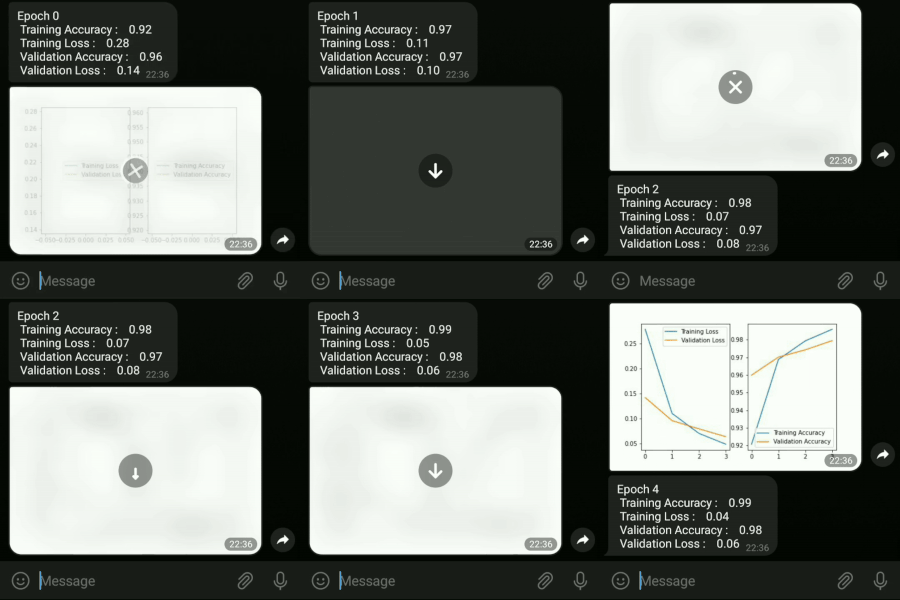
Receiving messages and photos on my device
The whole notebook containing all the required library imports and rest of the code is available here.
References :
- https://core.telegram.org/bots/api
- https://www.tensorflow.org/guide/keras/custom_callback#model_methods_that_take_callbacks
- https://medium.com/@ManHay_Hong/how-to-create-a-telegram-bot-and-send-messages-with-python-4cf314d9fa3e
- https://gist.github.com/stared/dfb4dfaf6d9a8501cd1cc8b8cb806d2e
- https://machinelearningmastery.com/handwritten-digit-recognition-using-convolutional-neural-networks-python-keras/
Originally published on Medium.