Logistic Regression is a fundamental machine learning algorithm used for binary classification tasks. Despite its name, it’s a linear model that uses a sigmoid function to output probabilities. It’s simple, efficient, and highly interpretable. However, its linear nature presents a significant challenge when dealing with data that isn’t linearly separable.
The Challenge of Non-Linear Data
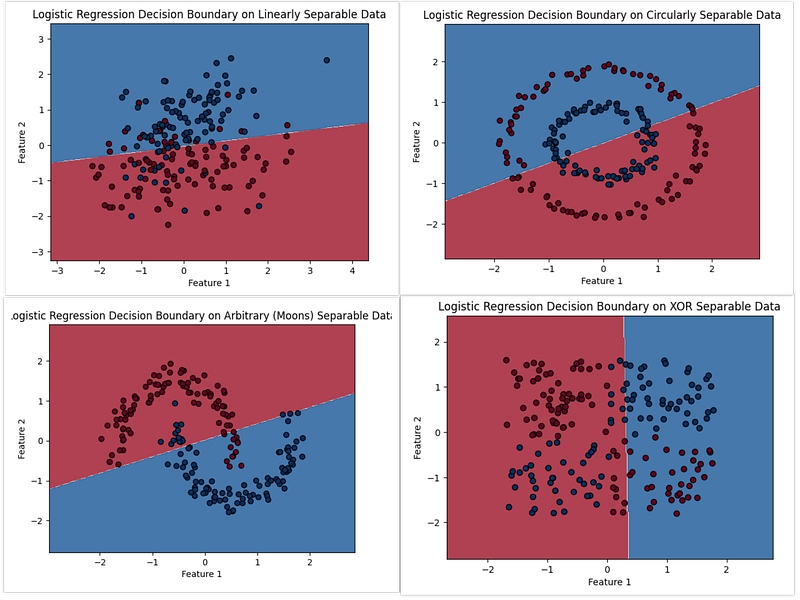
To illustrate this challenge, let’s consider various 2D datasets:
-
Linearly Separable Data: Here, a straight line can perfectly separate the two classes.
-
Circularly Separable Data: The data points form concentric circles, requiring a circular decision boundary.
-
XOR Separable Data: This classic problem requires a non-linear boundary to distinguish the classes.
-
Arbitrary (Moons) Separable Data: Two crescent-shaped clusters that are clearly non-linear.
When we apply standard Logistic Regression to these datasets, we observe its limitations:
Code to illustrate Logistic Regression on various datasets:
import numpy as np
import matplotlib.pyplot as plt
from sklearn.linear_model import LogisticRegression
from sklearn.datasets import make_classification, make_circles, make_blobs, make_moons
from sklearn.model_selection import train_test_split
from sklearn.preprocessing import StandardScaler

def plot_decision_boundary(X, y, model, title="Decision Boundary"):
    """Plots the decision boundary of a classifier."""
    x_min, x_max = X[:, 0].min() - 1, X[:, 0].max() + 1
    y_min, y_max = X[:, 1].min() - 1, X[:, 1].max() + 1
    xx, yy = np.meshgrid(np.arange(x_min, x_max, 0.02),
                         np.arange(y_min, y_max, 0.02))
    Z = model.predict(np.c_[xx.ravel(), yy.ravel()])
    Z = Z.reshape(xx.shape)
    plt.contourf(xx, yy, Z, alpha=0.8, cmap=plt.cm.RdBu)
    plt.scatter(X[:, 0], X[:, 1], c=y, cmap=plt.cm.RdBu, edgecolors='k')
    plt.title(title)
    plt.xlabel('Feature 1')
    plt.ylabel('Feature 2')
    plt.show()

# 1. Linearly Separable Data
def generate_linear_data(n_samples=100):
    X, y = make_classification(n_samples=n_samples, n_features=2, n_redundant=0,
                               n_informative=2, n_clusters_per_class=1,
                               random_state=42, flip_y=0.1)
    return X, y

# 2. Non-linearly Separable Data (Circular decision boundary)
def generate_circular_data(n_samples=100):
    X, y = make_circles(n_samples=n_samples, factor=0.5, noise=0.05, random_state=42)
    return X, y

# 3. Non-linearly Separable Data (XOR decision boundary)
def generate_xor_data(n_samples=100):
    X = np.random.rand(n_samples, 2) * 4 - 2 # Center around 0, spread from -2 to 2
    y = np.where(np.logical_xor(X[:, 0] > 0, X[:, 1] > 0), 0, 1)
    return X, y

# 4. Non-linearly Separable Data (Arbitrary decision boundary - using make_moons for crescent shapes)
def generate_arbitrary_data(n_samples=100):
    X, y = make_moons(n_samples=n_samples, noise=0.1, random_state=42)
    return X, y


def run_logistic_regression_and_plot(X, y, title="Dataset"):
    """Trains Logistic Regression and plots decision boundary."""
    print(f"\n--- {title} ---")

    # Scale features for better performance, especially important for non-linear cases
    scaler = StandardScaler()
    X_scaled = scaler.fit_transform(X)

    # Train a Logistic Regression model
    # For non-linear boundaries, we expect logistic regression (linear classifier) to perform poorly
    # on its own, but we still demonstrate its decision boundary.
    model = LogisticRegression(random_state=42, solver='liblinear')
    model.fit(X_scaled, y)

    # Plot decision boundary
    plot_decision_boundary(X_scaled, y, model, title=f"Logistic Regression Decision Boundary on {title}")


# --- Main Execution ---
if __name__ == '__main__':
    # 1. Linearly Separable Data
    X_linear, y_linear = generate_linear_data(n_samples=200)
    run_logistic_regression_and_plot(X_linear, y_linear, "Linearly Separable Data")

    # 2. Circularly Separable Data
    X_circular, y_circular = generate_circular_data(n_samples=200)
    run_logistic_regression_and_plot(X_circular, y_circular, "Circularly Separable Data")

    # 3. XOR Separable Data
    X_xor, y_xor = generate_xor_data(n_samples=200)
    run_logistic_regression_and_plot(X_xor, y_xor, "XOR Separable Data")

    # 4. Arbitrarily Separable Data (using make_moons)
    X_arbitrary, y_arbitrary = generate_arbitrary_data(n_samples=200)
    run_logistic_regression_and_plot(X_arbitrary, y_arbitrary, "Arbitrary (Moons) Separable Data")
As you can see from the plots, Logistic Regression performs well on linearly separable data. However, for circularly, XOR, and moons datasets, the model attempts to draw a straight line, resulting in poor classification performance. This is because Logistic Regression inherently learns a linear decision boundary in the original feature space.
The Power of Feature Transformation: Polynomial Features
Why Non-Linear Transformation is Required
The core limitation of Logistic Regression with non-linear data is its inability to learn complex, curved decision boundaries. To overcome this, we need to transform the data into a higher-dimensional space where it becomes linearly separable. This is where Polynomial Features come in.
PolynomialFeatures generates new features by raising existing features to a specified power and by creating interaction terms between features. For example, with two features x_1 and x_2 and a degree of 2, the original features (x_1, x_2) are transformed into (1, x_1, x_2, x_1², x_2², x_1x_2). In this expanded feature space, a hyperplane (which is linear) can often separate classes that were non-linearly separable in the original 2D space.
Why it is Still a Valid Logistic Regression Problem
Crucially, even after applying PolynomialFeatures, the problem remains a valid Logistic Regression problem. This is because:
- Linearity in Transformed Space: The Logistic Regression model is still learning a linear relationship, but now it’s linear with respect to the new, transformed polynomial features, not the original features. The decision boundary might look curved or complex in the original 2D space, but it’s a simple hyperplane in the higher-dimensional polynomial feature space.
- Model Form: The underlying mathematical form of the Logistic Regression model (a linear combination of features passed through a sigmoid function) remains unchanged. We are simply providing it with richer, more expressive input features.
We modified our plotting and training functions to incorporate PolynomialFeatures:
Code for modified functions:
from sklearn.preprocessing import PolynomialFeatures

def plot_decision_boundary(X, y, model, title="Decision Boundary", poly_transformer=None):
    """Plots the decision boundary of a classifier."""
    x_min, x_max = X[:, 0].min() - 1, X[:, 0].max() + 1
    y_min, y_max = X[:, 1].min() - 1, X[:, 1].max() + 1
    xx, yy = np.meshgrid(np.arange(x_min, x_max, 0.02),
                         np.arange(y_min, y_max, 0.02))

    # Prepare meshgrid for prediction
    meshgrid_data = np.c_[xx.ravel(), yy.ravel()]

    # Apply polynomial features if a transformer is provided
    if poly_transformer is not None:
        meshgrid_data_transformed = poly_transformer.transform(meshgrid_data)
        Z = model.predict(meshgrid_data_transformed)
    else:
        Z = model.predict(meshgrid_data)

    Z = Z.reshape(xx.shape)
    plt.contourf(xx, yy, Z, alpha=0.8, cmap=plt.cm.RdBu)
    plt.scatter(X[:, 0], X[:, 1], c=y, cmap=plt.cm.RdBu, edgecolors='k')
    plt.title(title)
    plt.xlabel('Feature 1')
    plt.ylabel('Feature 2')
    plt.show()

def run_logistic_regression_and_plot(X, y, title="Dataset", apply_poly_features=False, degree=2):
    """Trains Logistic Regression and plots decision boundary."""
    print(f"\n--- {title} ---")

    # Scale features
    scaler = StandardScaler()
    X_scaled = scaler.fit_transform(X)

    poly_transformer = None
    if apply_poly_features:
        poly_transformer = PolynomialFeatures(degree=degree, include_bias=False) # include_bias=False to avoid duplicate constant term
        X_transformed = poly_transformer.fit_transform(X_scaled)
        print(f"Applying Polynomial Features with degree={degree}. Original features: {X_scaled.shape[1]}, Transformed features: {X_transformed.shape[1]}")
        X_train_model = X_transformed
    else:
        X_train_model = X_scaled

    # Train a Logistic Regression model
    model = LogisticRegression(random_state=42, solver='liblinear', max_iter=1000) # Increased max_iter for convergence with poly features
    model.fit(X_train_model, y)

    # Plot decision boundary
    plot_decision_boundary(X_scaled, y, model,
                           title=f"Logistic Regression Decision Boundary on {title} (PolyFeat={apply_poly_features}, Degree={degree})",
                           poly_transformer=poly_transformer)
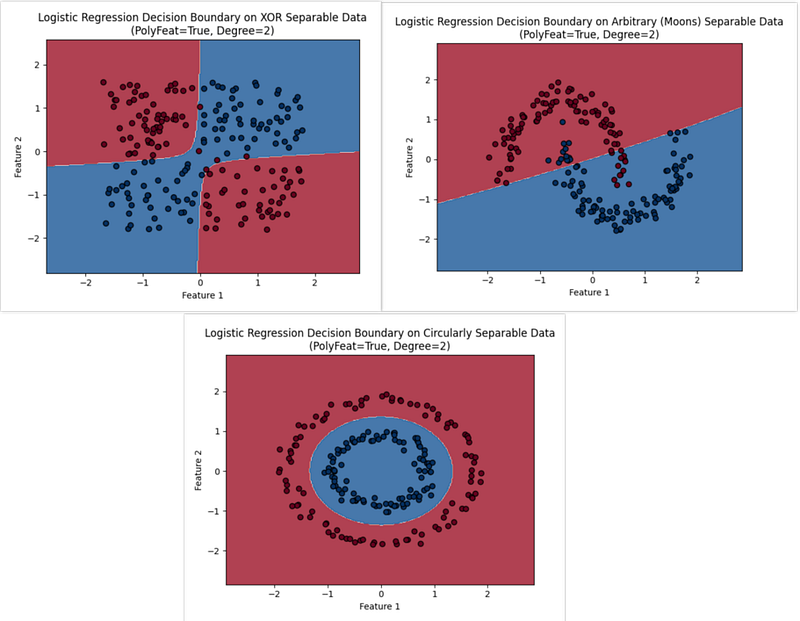
Let’s apply this to our non-linear datasets:
Code to run LR with Polynomial Features on non-linear data:
print('--- Running Logistic Regression with Polynomial Features ---')

# 2. Circularly Separable Data with Polynomial Features
run_logistic_regression_and_plot(X_circular, y_circular, "Circularly Separable Data", apply_poly_features=True, degree=2)

# 3. XOR Separable Data with Polynomial Features
run_logistic_regression_and_plot(X_xor, y_xor, "XOR Separable Data", apply_poly_features=True, degree=2)

# 4. Arbitrarily Separable Data (using make_moons) with Polynomial Features
run_logistic_regression_and_plot(X_arbitrary, y_arbitrary, "Arbitrary (Moons) Separable Data", apply_poly_features=True, degree=2)
You should now observe significantly better decision boundaries for the Circular, XOR, and Moons datasets, as the model can now capture their non-linear structures.
Investigating Different Polynomial Degrees
We can still see that even after a polynomial transformation, the classifier is unable to classify the Moons dataset properly.
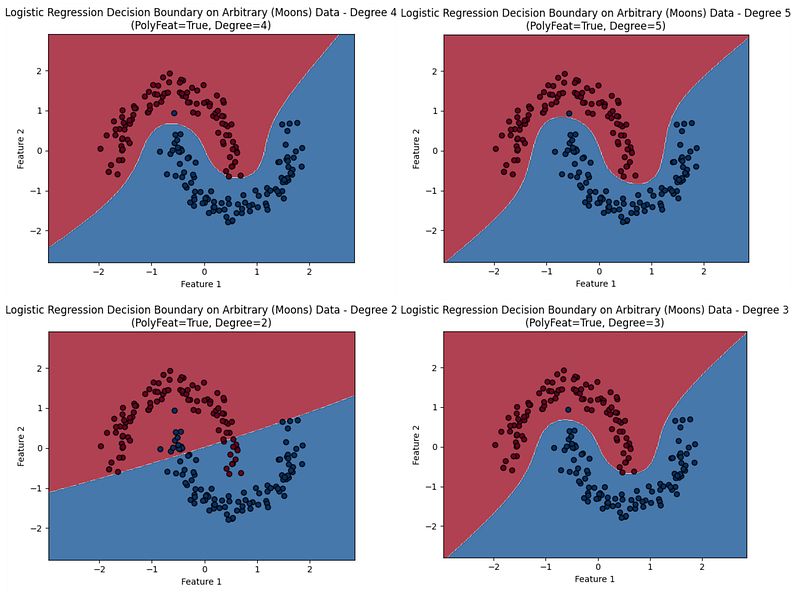
The choice of polynomial degree is important. A higher degree can fit more complex patterns but also increases the risk of overfitting. Let’s explore how different degrees affect the ‘Moons’ dataset:
Code to investigate polynomial degrees:
# Original (Degree 1 - linear)
run_logistic_regression_and_plot(X_arbitrary, y_arbitrary, "Arbitrary (Moons) Data - Degree 1", apply_poly_features=False)

# Degree 2 (already run, but for comparison)
run_logistic_regression_and_plot(X_arbitrary, y_arbitrary, "Arbitrary (Moons) Data - Degree 2", apply_poly_features=True, degree=2)

# Degree 3
run_logistic_regression_and_plot(X_arbitrary, y_arbitrary, "Arbitrary (Moons) Data - Degree 3", apply_poly_features=True, degree=3)

# Degree 4
run_logistic_regression_and_plot(X_arbitrary, y_arbitrary, "Arbitrary (Moons) Data - Degree 4", apply_poly_features=True, degree=4)

# Degree 5
run_logistic_regression_and_plot(X_arbitrary, y_arbitrary, "Arbitrary (Moons) Data - Degree 5", apply_poly_features=True, degree=5)
Observe how a degree of 1 (linear) performs poorly, while higher degrees (e.g., degree 2 or 3) provide better separation. Very high degrees might show overly complex boundaries that fit the noise in the training data.
Conclusion
Logistic Regression, although inherently a linear model, can be effectively extended to handle non-linear classification problems by employing feature transformation techniques, such as ***PolynomialFeatures***. This process allows the model to learn complex decision boundaries in the original feature space by operating linearly in a higher-dimensional, transformed feature space. This approach demonstrates the flexibility and power of combining simple models with intelligent feature engineering.
Originally published on Medium.