
This article explains how the system works end-to-end, focusing on the role of each directory and how data flows through the pipeline.
Project Objective
The goal of awesome-topics is to:
- Automatically discover newly published research papers
- Organize them by topic → venue → year
- Store results in a structured, version-controlled format
- Generate clean, navigable Markdown pages
- Publish updates automatically via GitHub Pages
Once configured, the repository continuously maintains a public research index at:
https://<user-name>.github.io/awesome-topics
The code for this article can be found here:
Read the rest of the article to understand how the code works, and create your own list of research papers.
High-Level Pipeline Overview
The project follows a clear, multi-stage pipeline:
- Topic configuration defines what to search for
- DBLP querying logic discovers new papers
- Structured YAML storage persists paper metadata
- Markdown generation scripts create topic pages
- GitHub Actions runs the pipeline and deploys updates
Each stage is cleanly separated, which makes the system robust, extensible, and easy to debug.
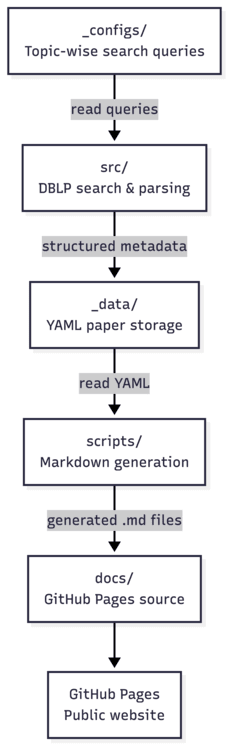
Data Flow Diagram
Repository Structure and Responsibilities
awesome-topics/
│
Each directory plays a specific role in the automation pipeline.
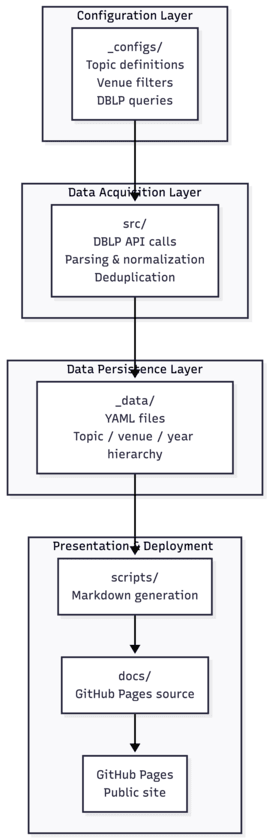
System Architecture Diagram
1. Topic Configuration (_configs/)
The _configs/ directory defines what research topics are tracked and how papers are searched.
Each configuration file specifies:
- Topic identifier (slug)
- Search keywords
- Venue filters (e.g., NeurIPS, ICML, ICLR, CVPR, IJCAI)
- DBLP query parameters
Design Rationale
This configuration-driven design allows:
- Adding new topics without modifying the source code
- Independent control over search behaviour per topic
- Easy scaling to dozens of research areas
In practice, adding a new topic simply requires creating a new configuration file.
2. Paper Discovery via DBLP (src/)
The src/ directory contains all logic related to searching DBLP and collecting paper metadata.
Responsibilities
- Construct DBLP queries using
_configs/ - Fetch publication data via DBLP APIs
- Parse and normalize responses
- Detect newly added papers
- Avoid duplicates across runs
The output of this stage is structured paper metadata, not Markdown.
3. Structured Paper Storage (_data/)
All discovered papers are stored in YAML files inside the _data/ directory.
Each YAML file corresponds to a topic and contains:
- Topic metadata
- Venue-wise paper lists
- Year-wise grouping
- Stable markers for incremental updates
Why YAML?
Using YAML as an intermediate representation provides:
- Clear separation between data and presentation
- Deterministic, idempotent updates
- Easy version control and inspection
- Reusability for future analytics or visualization
This layer acts as the single source of truth for the project.
4. Markdown Page Generation (scripts/)
The scripts/ directory is responsible for transforming structured YAML data into Markdown pages.
Key Responsibilities
- Read topic-wise YAML files from
_data/ - Generate Markdown files for each topic
- Create collapsible sections for venues and years
- Insert anchors and table-of-contents links
- Ensure consistent formatting across topics
Importantly:
The Markdown files in
docs/are not edited directly. They are fully generated and updated by scripts based on the YAML data.
This ensures that presentation logic is fully automated and reproducible.
5. GitHub Pages Content (docs/)
The docs/ directory contains the rendered output that GitHub Pages serves.
docs/_topics/
- Contains topic-wise Markdown pages
- Each page is generated from YAML via scripts
- URLs map cleanly to topic names
docs/index.md
- Acts as the landing page
- Automatically updated to include new topics
- Links to all topic-wise pages
- Lastly, it is to be noted that the index.md file is generated from the README.md file, and the user can edit it manually to include any extra information the user wants to display. For example, I have listed the conference venues and journal names from which I have searched the listed papers.
GitHub Pages renders this directory directly, making the site live after every successful automation run.
6. Full Automation with GitHub Actions
The pipeline is orchestrated using GitHub Actions defined in .github/workflows/.
Workflow Execution
On a scheduled trigger or manual dispatch:
- The repository is checked out
- DBLP search scripts in
src/are executed - YAML files in
_data/are updated if new papers are found - Markdown generation scripts in
scripts/regenerate topic pages - Changes are committed only if updates exist
- GitHub Pages redeploys automatically
This results in a self-updating research website.
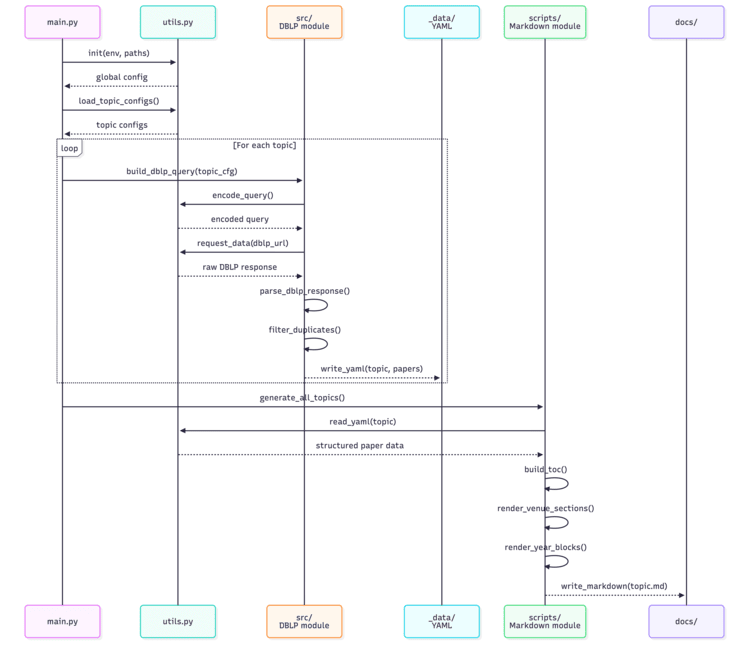
Conceptual Functional Call Level Diagram (May not exactly match the function calls)
Incremental Updates and Deduplication
To ensure stability across runs:
- Previously recorded papers are never duplicated
- New papers are appended in the correct venue/year section
- Existing anchors and page structure remain unchanged
This makes the system safe to run daily.
Design Philosophy
The project follows a few key principles:
- Data first: YAML is the authoritative layer
- Code-driven presentation: Markdown is generated, never edited
- Configuration over hardcoding
- Reproducibility and transparency
This architecture mirrors best practices used in large-scale data pipelines.
Who Is This For?
- Researchers maintaining public paper lists
- Labs curating structured reading resources
- Survey authors tracking literature growth
- Students organizing research topics systematically
The system scales naturally as research interests expand.
Learn How to Add New Topics
Closing Remarks
awesome-topics turns research paper curation into a fully automated, reproducible pipeline by cleanly separating configuration, data collection, storage, and presentation. Once set up, it requires no maintenance — yet continuously reflects the evolving research landscape.
By combining DBLP queries, structured YAML storage, script-driven Markdown generation, and GitHub Actions automation, the project demonstrates a practical and scalable approach to research curation.
Disclaimer
This repository combined code from two repositories, forked from FL-paper-update-tracker and Awesome-FL.
Originally published on Medium.