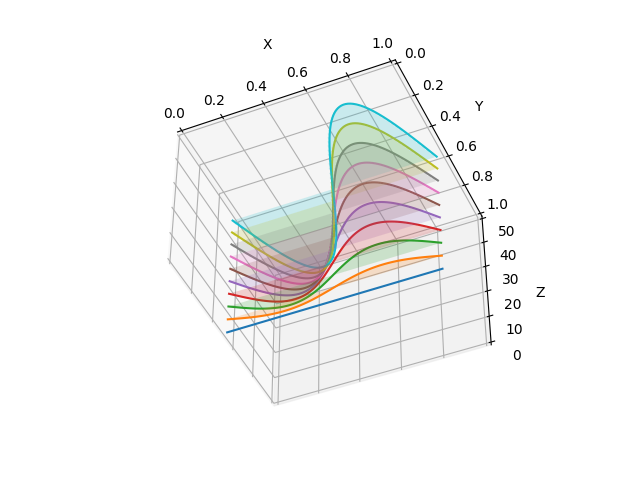
In this article, we will learn how to plot multiple 2D series data in a single 3D plot like the one shown below!!
Step 1: Importing required libraries (or only a few objects)
from mpl_toolkits.mplot3d import Axes3D
import numpy as np
import matplotlib.pyplot as plt
Step 2: Defining a figure and axis
fig = plt.figure()
ax = fig.add_subplot(projection=’3d’)
Step 3: Getting some data
# Plot a sin curve using the x and y axes.
for z in range(0, 50, 5):
    x = np.linspace(0, 1, 100)
    y = z*np.sin(x * 2 * np.pi) / 50 / 2 + 0.5
    plot2din3d(x, y, z)
Step 4: plot2din3d()
def plot2din3d(x,y,z):
    ax.plot(x, y, zs=z, zdir='z')
    2d_col_obj = ax.fill_between(x, 0.5, y, step='pre', alpha=0.1)
    ax.add_collection3d(2d_col_obj, zs = z, zdir = 'z')
Step 5: Set Legend, set axes limits and labels
#ax.legend()
ax.set_xlim(0, 1)
ax.set_ylim(0, 1)
ax.set_zlim(0, 50)
ax.set_xlabel(‘X’)
ax.set_ylabel(‘Y’)
ax.set_zlabel(‘Z’)
Step 6: Customizing View Angle
ax.view_init(elev=20., azim=-35)
Step 7: Plot the plot
plt.show()
Final Result
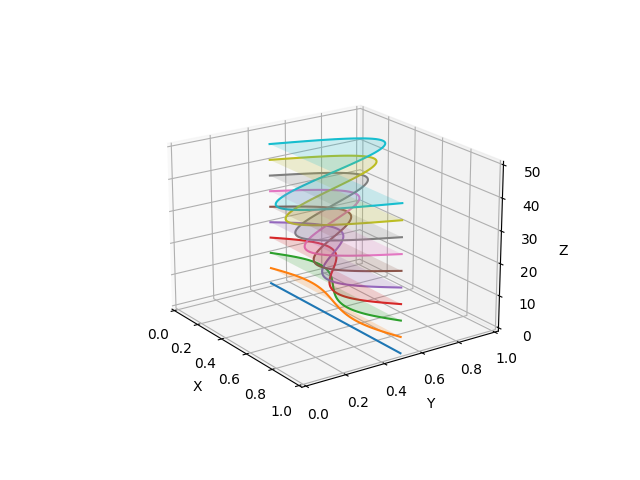
We can do this for any type of series data!!
The data above was, however, dense. Hence, looks continuous.
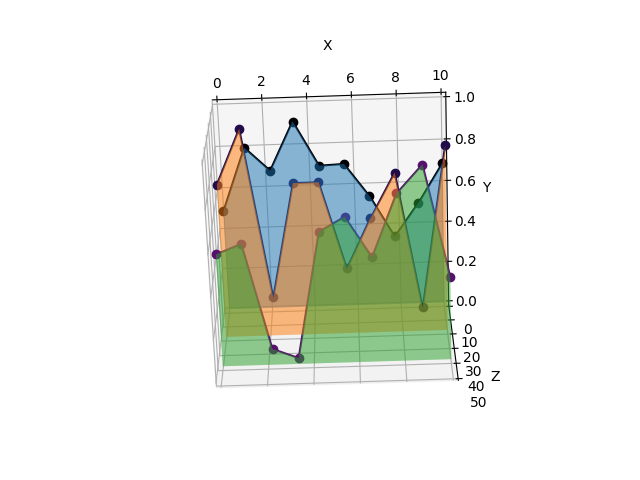
How about discrete data, not so densely spaced?
Let us, set some values to some variables, which we can tweak to obtain different plots!!
num_samples = 10
num_series = 3
minx, maxx = 0, 10
res = 100
zmin, zmax = 0, 60
zinterval = 20
Next,
y = np.random.random((num_series,num_samples))
x = np.linspace(minx, maxx, num_samples)
z_idx_range = int((zmax-zmin)/zinterval)
colors = plt.cm.get_cmap(‘inferno’,z_idx_range)
Next, we interpolate points between the samples data points, to get a continuous looking plot!!
for i in range(z_idx_range):
    z = zinterval*i + zmin
    yz, ys, ye = y[i,:], None, None
    ynew_ = np.array([])
    for j in range(y.shape[1]-1):
        ys = y[i,j]
        ye = y[i,j+1]
        ynew_ = np.append(ynew_, np.linspace(ys, ye, res), axis = 0)
    xz = np.linspace(minx, maxx, (y.shape[1]-1)*res)
    plot2din3d_discrete(xz,x,ynew_,yz,z,colors(i))
plot2din3d_discrete()
def plot2din3d_discrete(x,xo,y,yo,z,c):
    ax.plot(xo, yo,’o’,color=c,zs=z, zdir=’z’)
    ax.plot(x, y, color=c,zs=z, zdir=’z’)
    # Add a 3D collection object to the plot.
    2d_col_obj = ax.fill_between(x, 0.0, y, step='mid', alpha=0.3)
    ax.add_collection3d(2d_col_obj, zs = z)
Finishing Touches!!!
Steps 5 to 7 in the first example.
Result
References:
- https://github.com/artmenlope/matplotlib-fill_between-in-3D/blob/master/FillBetween3d.py
- https://matplotlib.org/2.0.2/mpl_toolkits/mplot3d/api.html
- https://matplotlib.org/3.5.1/api/_as_gen/matplotlib.axes.Axes.fill_between.html
- https://www.tutorialspoint.com/how-to-fill-the-area-under-a-step-curve-using-pyplot-matplotlib#:~:text=To%20fill%20the%20area%20under%20the%20curve%2C%20put%20x%20and,figure%2C%20use%20show()%20method.
Clap, Follow and Share if you found this post useful!!
Originally published on Medium.